How to Start a SaaS Business Beyond the App
How to start a SaaS business beyond the product: the auth, billing, infrastructure, support, compliance, and distribution systems you need to plan.
To start a SaaS business, you need more than an app. You need a safe way to identify customers, take and reconcile payments, deploy and recover the product, support users, handle data responsibly, and create demand.
This is that operating inventory: what each part does, what drives its cost, and which parts you can defer. No idea-validation detour and no universal dollar estimate that will be stale by the time you read it.
The shape of the problem
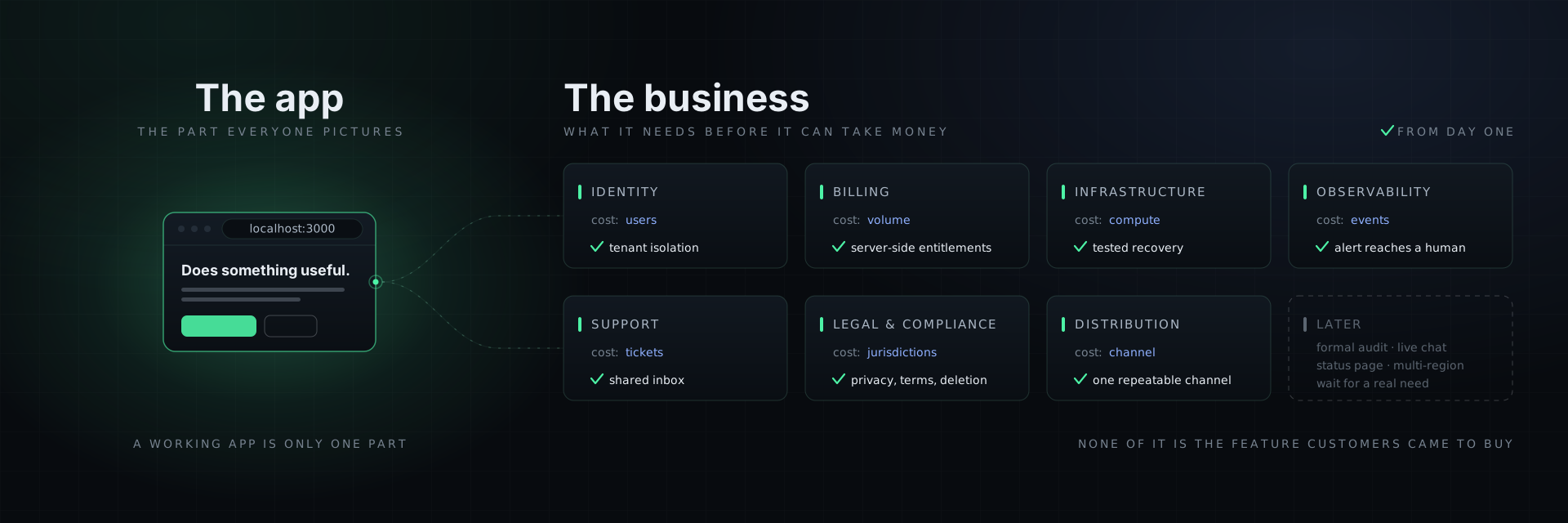
A working app is only one part of a SaaS business. The rest becomes obvious when you write out the list.
Your app does something useful. To charge money for it, you also need a way for people to sign up and stay signed in, a way to take payments and handle the seventeen things that go wrong with payments, somewhere to run it that stays up, a way to know when it stops staying up, a way for customers to reach you when it does, a legal footing to collect personal data at all, and some reason for anyone to show up in the first place.
None of those systems is the feature customers came to buy. Most are still required, and much of the work is common across SaaS businesses even when the implementation details differ.
1. Identity: accounts, sessions, and the tenancy problem
You need users who can sign up, sign in, reset a forgotten password, and stay signed in across devices. That is the easy half.
The hard half is tenancy: making sure customer A can never see customer B's data. A missing tenant boundary in a query, route, background job, cache key, or object path can turn an ordinary defect into a disclosure incident.
For most small teams, a maintained identity provider is safer than building authentication from scratch. Services such as Clerk, Auth0, WorkOS, or Supabase Auth can handle identity, but tenant authorization still belongs in your application. Turn row-level security on from day one rather than "before launch." We've written about the security holes AI-generated apps ship with; a permissive tenant boundary can expose one customer's data to another.
Cost drivers: active users, organizations, authentication methods, enterprise features, and support. Work: sign-in can be quick to wire; authorization and tenant isolation need review across every data-access path.
2. Billing: the part that is never done
Checkout is a weekend. Billing is forever.
The checkout flow, where a customer clicks, pays, and gets access, is the demo. The continuing work is everything after it: renewals, failed cards, dunning, upgrades, refunds, disputes, tax handling, and plan changes.
Much of that reaches you as webhooks, which can arrive out of order, arrive more than once, or fail delivery. Keep subscription state in your database and update it idempotently from verified provider events. Never grant access just because someone visited a success page. Check paid entitlements on the server.
Then there is tax. Your obligations depend on what you sell, where the business is established, and where customers are located. A merchant of record can assume more of the payment and tax administration in exchange for higher fees. A payment processor gives you more control and leaves more compliance work with your business. Get advice for the jurisdictions that apply to you.
Cost drivers: transaction volume, payment methods, billing features, tax coverage, disputes, and whether you use a merchant of record. Work: checkout is the beginning; reconciliation, webhook handling, entitlement state, and support continue for the life of the product. Full walkthrough: how to monetize an app.
3. Infrastructure: somewhere to run that stays up
At minimum: a managed Postgres with automated backups, a place to run your application, HTTPS on your own domain, and a deploy process that can be reversed.
The rule people skip is restore a backup once, deliberately, before you need to. An untested backup is a wish. Do it on a Saturday when nothing is on fire and you will discover the two things wrong with it while nobody is watching.
Your first real decision is how much infrastructure to manage yourself. A managed application platform can reduce setup and operational work. A general cloud gives you more control, but you assemble and operate more of the system. Compare the total cost of ownership, including engineering time, before optimizing the server bill.
Cost drivers: compute, database capacity, storage, bandwidth, environments, backups, and support level. Work: initial setup, upgrades, capacity changes, recovery tests, and incidents.
4. Observability: knowing before your customers tell you
Right now your monitoring is you, refreshing the tab. That does not survive having customers in other timezones.
You need three things: error tracking so exceptions land somewhere you will look, uptime checks on the paths that make money, and an alert that reaches a human when those paths fail. A dashboard nobody watches during an incident is only a historical record.
Monitor the money paths specifically, not just the homepage. A landing page that's up while sign-in is down is the worst kind of "up," because every external check says green while every customer says otherwise.
Cost drivers: event volume, retention, synthetic-check frequency, and on-call delivery. Work: setup is modest; tuning alerts and maintaining runbooks is ongoing.
5. Support: a human at the other end
Customers will email you. They need somewhere to do it, and you need to answer faster than you'd like.
Start with a shared inbox and a visible email address. Add a help centre when the same questions recur. That is a better signal than a calendar date. Skip live chat until you can staff it reliably; an unanswered chat widget creates the wrong expectation.
Cost drivers: support seats, channels, service level, and ticket volume. Work: variable and never completely automatable, which is why it belongs in the plan.
6. The legal and compliance floor
The legal and privacy floor depends on your product, data, customers, and jurisdictions. Common work includes accurate privacy disclosures, terms, consent where required, data-retention rules, and a tested process for account and data deletion.
If you sell to businesses, customers may ask for security documentation or independent assurance before they buy. You may not need a formal audit at the start, but choices about access control, evidence, vendors, and data retention are much cheaper to document from day one.
Cost drivers: jurisdictions, data sensitivity, contract complexity, customer requirements, and external legal or audit support. Generated templates are a starting point, not legal approval.
7. Distribution: the reason anyone shows up
The part founders defer longest and regret most. Building took months; nobody arriving is not a marketing problem you solve in an afternoon.
You need at least one repeatable way to reach people who do not already know you. Content and SEO can compound slowly, paid ads can create traffic quickly at a direct cost, and targeted outreach can start with time instead of an audience. We've written the specifics in how to get your first 25 customers, SEO for SaaS, and your first ad campaign.
Cost drivers: the channel, production cadence, media spend, tools, and the founder time required to learn what resonates. Work: this is a continuing function, not a launch task.
What it actually costs
Provider prices change, and a single dollar total hides the assumptions that matter. Build your budget from the units your business will actually consume:
| Line item | Budget from |
|---|---|
| Hosting + database | Environments, traffic, storage, backup retention |
| Auth | Active users, organizations, enterprise features |
| Payments | Volume, payment methods, disputes, tax model |
| Transactional email | Messages, dedicated sending needs, support |
| Monitoring + logs | Events, retention, checks, on-call delivery |
| Analytics | Captured events, retention, warehouse exports |
| Support + legal | Seats, volume, contracts, jurisdictions |
Get current quotes, add a contingency for usage spikes, and set billing alerts. Then budget the less visible input: attention. Each system adds setup, upgrades, edge cases, and interruptions. That ongoing operating cost is often more constraining than the first month's software bill.
Before you build, put these rows in a budget with an owner, a usage assumption, a failure mode, and a monthly review date. The total matters, but the more useful output is knowing which assumption can change the bill or interrupt the business.
What you can actually skip at the start
To be fair to the list, some of it is genuinely deferrable:
- Formal assurance, a large help centre, live chat, a status page: wait for a customer or operating need
- Kubernetes, microservices, multi-region: wait for scale, isolation, or resilience requirements that justify the complexity
- A bespoke design system: start with a well-supported component library
- Broad analytics: begin with acquisition, activation, retention, and payment
Do not skip tenancy isolation, tested recovery, server-side entitlement checks, or an alert that reaches a responsible human. Those controls limit the failures most likely to threaten customer trust or business continuity.
What this looked like at ListMyCar
ListMyCar.ai started with a conventional repository containing a frontend, API, database migrations, authentication, billing integration, local development, and an AWS CDK definition. Those systems did not make the product valuable; they gave the team a foundation on which it could build the listing workflow without reopening the same setup decisions.
The continuing work mattered just as much. The business added four loops around the product: ship changes through a repeatable delivery path, measure the customer journey, recover from failures, and grow from observed demand. From April through August 2026, more than 50 people created a listing. That is early adoption, not proof that every operating choice was correct, but it is evidence that the foundation supported a real customer path rather than a demo.
The full case study shows the repository, operating loops, and measured results: how Solo runs ListMyCar.ai.
Turn the checklist into an operating system
Every item above is a known problem. The work comes from wiring the parts together for your application and then owning those integrations over time.
That is the gap Solo was built for. You describe the business; Solo assembles it on a standard stack of Next.js, FastAPI, Postgres, Stripe, and AWS, with authentication, billing webhooks, a managed database, deployment, and monitoring wired together. Then it keeps running health checks, incident triage, and scheduled marketing work, with human approval at consequential steps.
The stack is deliberately boring and the repo is genuinely yours. Standard parts, no proprietary runtime, and you can walk away with the code and run it without us.
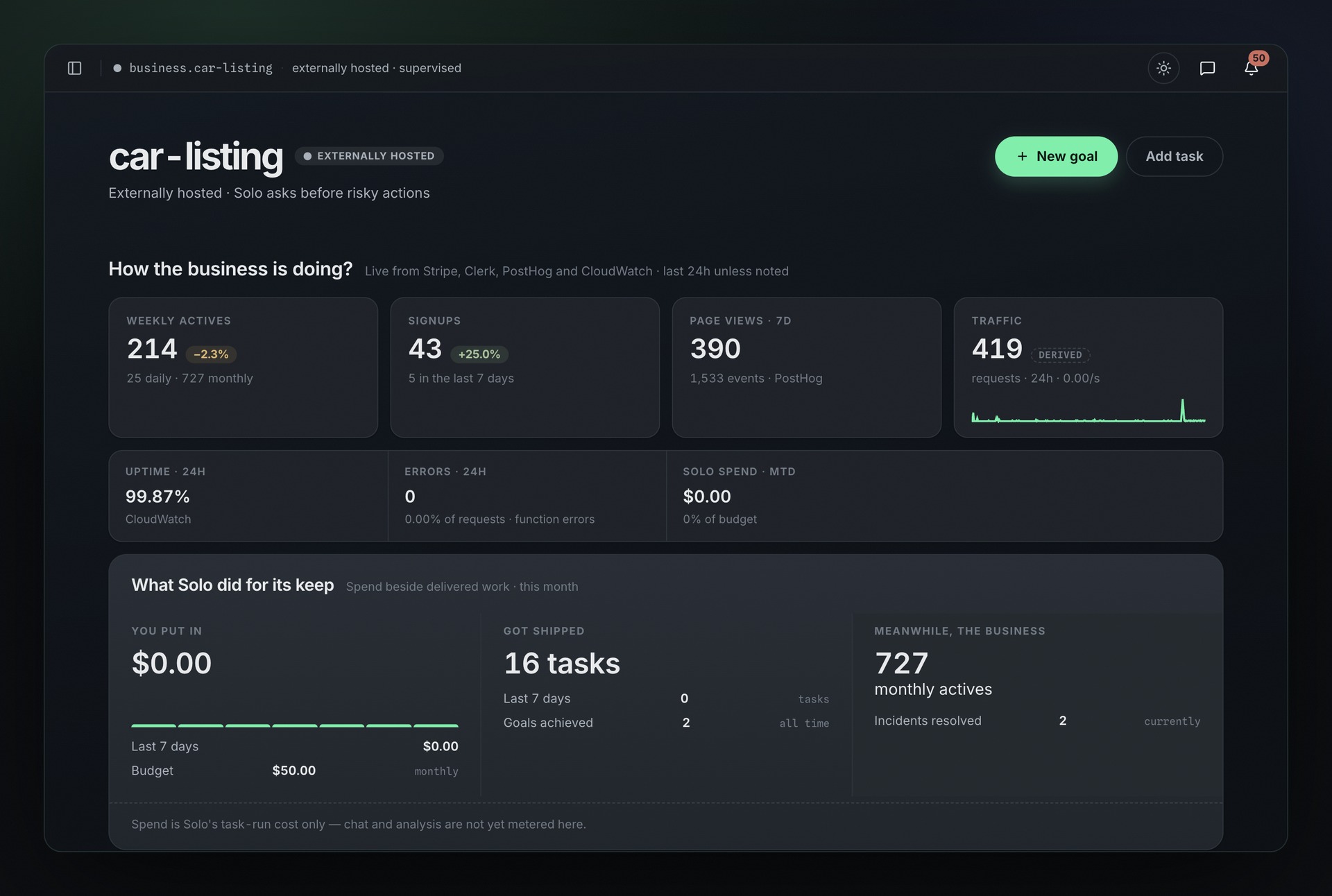 One of our own businesses. Clerk supplies signups, PostHog supplies traffic, and CloudWatch supplies health data. Solo brings those operating signals into one view.
Start with the operating foundation assembled. Solo connects the systems above and keeps the recurring work moving so you can focus on the product and its customers. Join the waitlist →